The agentic washing machine

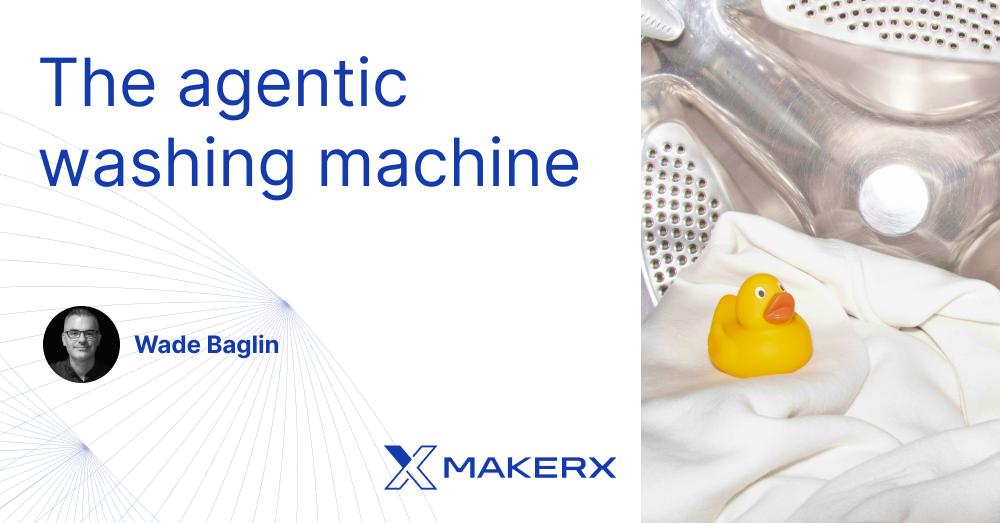
What is the agentic washing machine? It's a reference skill that demonstrates a pattern for building a CLI-like interface that accepts natural language input to perform a task. It works well by directly slash-activating /the-skill or through context activation, where the AI itself must decide to activate it.
For this blog post, I'll use Claude Code-styled skills and references. Do note that skills are universal in concept, even though there are differences in practice among AI providers. For example, Claude Code supports the custom frontmatter field argument-hint, creating a really nice UX.

So why might you want to build your own agentic washing machine? Well, there are a few things this pattern is really good at. These include grouping the skill's sub-features into their own reference file, enabling activation of one or more sub-features, and providing a way to apply behaviour, including agentic capabilities.
Coupled with tests, it provides a solid foundation for a maintainable, functional skill.
Let's talk about usage.
When slash-activating /the-skill, the user can add natural language arguments after the slash to activate the skill in different ways. For example, maybe they want to run a quick wash, /washing-machine quick-wash. Or, because it's the future after all, why is Claude not deciding? /washing-machine auto
And this even works well with context activation: "Claude, the laundry needs a quick wash; you decide the small stuff."
Washing Machine Spec
To demonstrate this pattern, let’s break down a washing machine into its various parts. The most fundamental of these are Pre-wash, Soak, Wash, Rinse, and Spin.
To make it easier to select sub-features, the machine also supports these common groups:
- Heavy Duty (pre-wash, soak, wash, rinse, spin)
- Standard (pre-wash, wash, rinse, spin)
- Quick (wash, rinse, spin)
- Delicates (pre-wash, wash, rinse)
And in a typical washing machine form, there are a few toggles for adjusting machine behaviour:
- Double wash (double the wash time)
- Extra rinse (add an extra rinse cycle)
- Super spin (very high spin speed)
Lastly, because it's the future, this machine is AI-enabled, giving access to an agentic washing flow:
- Auto (agent selects the best flow based on the load)
Signals, Behaviours, and References
The SBR (Signals, Behaviours, and References) is the key to this pattern. Signals are used to match natural language to sub-features. Behaviours define how the sub-features are activated. And references are used to store sub-feature knowledge.
Signals map signal phrases to sub-features. For example, "spin", "dry", and "remove water" all map to the spin sub-feature. And some phrases group multiple sub-features together, like "heavy duty", which includes "pre-wash", "soak", "wash", "rinse", and "spin".
A bare-bones signal table maps features and feature groups, along with common alternative phrases for sub-features, allowing users to select the features they want more easily using natural language. And even when the exact phrase is not in the table, a beautiful thing about AI like Claude is that it can infer the user’s intent and likely select the correct feature anyway.
| Signal phrases | Sub-feature |
|---|---|
| "pre-wash", "pre-clean" | Pre-wash |
| "wash", "clean", "renew" | Wash |
| "soak", "pre-soak" | Soak |
| "rinse", "pre-rinse" | Rinse |
| "spin", "pre-spin", "dry", "remove water" | Spin |
| "heavy duty", "heavy soil", "dirty" | Pre-wash, soak, wash, rinse, spin |
| "standard", "default", "normal" | Pre-wash, wash, rinse, spin |
| "quick", "fast", "express" | Wash, rinse, spin |
| "delicates", "gentle", "fragile" | Pre-wash, wash, rinse |
Behaviours define how the sub-features are activated and behave. Similar to the phrases in the signal table, the behaviours table maps cues to behavioural traits.
What the default is, and the scope of where the behaviour applies, are also defined here.
| Behaviour | Cues | Default | Applies to |
|---|---|---|---|
| Auto (skip confirmation) | "just do it", "no confirm", "auto", "no prompt" | Off | All phases |
| Dry run | "just show me", "preview", "don't actually wash" | Off | All phases |
| Double wash | "double wash", "extra wash", "twice the wash" | Off | Wash |
| Extra rinse | "extra rinse", "more rinse", "rinse twice" | Off | Rinse |
| Super spin | "super spin", "extra spin", "spin faster" | Off | Spin |
References are used to map combinations of signals and behaviours to the linked reference files that store the sub-feature knowledge. Loading these linked files on demand is called progressive disclosure, and it's an optimisation technique that loads only the knowledge relevant to the user's request. This reduces the number of tokens loaded into the context.
This is also where the load-and-execute order is encoded; after all, if Claude is going to pretend to be a washing machine, the order in which it pretends is important!
| File | Contents | When to load |
|---|---|---|
| agentic-wash.md | Agentic wash flow | if auto is selected |
| pre-wash.md | Pre-wash instructions | first or after agentic-wash |
| soak.md | Soak instructions | after pre-wash |
| wash.md | Wash instructions | after pre-wash and soak |
| rinse.md | Rinse instructions | after wash |
| spin.md | Spin instructions | after rinse |
The washing machine skill
Putting it all together, the washing-machine skill folder contains the following files:
| File | Contents | Purpose |
|---|---|---|
| SKILL.md | Main skill file | Routes signals to features and handles execution flow |
| agentic-wash.md | Agentic wash flow | Contains the agentic wash flow instructions |
| pre-wash.md | Pre-wash instructions | Contains the pre-wash instructions |
| soak.md | Soak instructions | Contains the soak instructions |
| wash.md | Wash instructions | Contains the wash instructions |
| rinse.md | Rinse instructions | Contains the rinse instructions |
| spin.md | Spin instructions | Contains the spin instructions |
The SKILL.md file is the one Claude reads for each added skill it can use.
There are three phases of activation, and each involves the SKILL.md file. First, the frontmatter description is loaded for use by context activation. Next, upon slash activation or context activation, the full SKILL.md file is read into the context. Lastly, Claude decides which linked reference files to read and load into the context on demand, enabling the progressive disclosure optimisation.
The general flow of the SKILL.md is:
Skill frontmatter # Meta for the AI and AI Tooling
Signal table      # Maps signal phrases to sub-features
Behaviour table   # Maps behavioural cues to traits, includes defaults
Routing and args  # Processes args and sub-feature routing
Execution         # Describes how to execute the skill
References        # Links to sub-features knowledge, includes execution order
As you can see below, the skill content is very self-documenting. And for good reason; this is what Claude follows.
---
name: washing-machine
description: Runs a washing machine cycle on laundry. Triggers: "wash", "laundry", "clean clothes", "heavy duty", "quick wash", "delicates", "rinse", "spin", "pre-wash", "soak"
argument-hint: "[heavy-duty|standard|quick|delicates|auto] [auto, dry-run, double-wash, extra-rinse, super-spin]"
---

# Washing Machine

Run a washing cycle by selecting sub-features directly or via a preset cycle.

## Sub-feature Signal Table

| Signal phrases                            | Sub-feature                       |
| ----------------------------------------- | --------------------------------- |
| "pre-wash", "pre-clean"                   | Pre-wash                          |
| "wash", "clean", "renew"                  | Wash                              |
| "soak", "pre-soak"                        | Soak                              |
| "rinse", "pre-rinse"                      | Rinse                             |
| "spin", "pre-spin", "dry", "remove water" | Spin                              |
| "heavy duty", "heavy soil", "dirty"       | Pre-wash, soak, wash, rinse, spin |
| "standard", "default", "normal"           | Pre-wash, wash, rinse, spin       |
| "quick", "fast", "express"                | Wash, rinse, spin                 |
| "delicates", "gentle", "fragile"          | Pre-wash, wash, rinse             |

## Behavioural Modifiers

Detect these from the user's natural language:

| Behaviour                | Cues                                                                               | Default | Applies to |
| ------------------------ | ---------------------------------------------------------------------------------- | ------- | ---------- |
| Auto (skip confirmation) | "just do it", "go ahead", "no need to confirm", "auto", "no prompt", "over to you" | Off     | All phases |
| Dry run                  | "just show me", "preview", "don't actually wash"                                   | Off     | All phases |
| Double wash              | "double wash", "extra wash", "twice the wash"                                      | Off     | Wash       |
| Extra rinse              | "extra rinse", "more rinse", "rinse twice"                                         | Off     | Rinse      |
| Super spin               | "super spin", "extra spin", "spin faster"                                          | Off     | Spin       |

## Routing

Scan both `$ARGUMENTS` and the user's original message for signal phrases and behavioural modifiers.

When a signal phrase is detected, route directly to the matched sub-features.

When no signal phrase is detected, use AskUserQuestion:

```yaml
header: "Cycle"
question: "What wash cycle would you like?"
multiSelect: false
options:
  - label: "Heavy Duty"
    description: "Pre-wash, soak, wash, rinse, and spin for heavily soiled laundry"
  - label: "Standard"
    description: "Pre-wash, wash, rinse, and spin for everyday laundry"
  - label: "Quick"
    description: "Wash, rinse, and spin for lightly soiled laundry"
  - label: "Delicates"
    description: "Pre-wash, wash, and rinse for fragile fabrics"
  - label: "Auto"
    description: "Let the machine analyse the load and pick the best cycle"
```

## Execution

Once a cycle is selected, run each sub-feature in order. For each phase:

1. Load the reference file for that phase
2. Follow the instructions in the reference
3. Write a short description of the step just completed before moving to the next

If dry run is active, describe what each phase would do without executing it.

If auto (skip confirmation) is NOT active, use AskUserQuestion to confirm before starting.

## References

| File                               | Contents              | When to load                 |
| ---------------------------------- | --------------------- | ---------------------------- |
| [agentic-wash.md](agentic-wash.md) | Agentic wash flow     | If Auto cycle is selected    |
| [pre-wash.md](pre-wash.md)         | Pre-wash instructions | First, or after agentic wash |
| [soak.md](soak.md)                 | Soak instructions     | After pre-wash               |
| [wash.md](wash.md)                 | Wash instructions     | After pre-wash and soak      |
| [rinse.md](rinse.md)               | Rinse instructions    | After wash                   |
| [spin.md](spin.md)                 | Spin instructions     | After rinse                  |
Read this skill and also view the other parts on GitHub.
Skill testing
Maintaining the skill means testing it after adding or modifying features or when new models are released.
Post-model-release testing is especially important to confirm that the skill still works as expected. This is also an important opportunity to reduce the skill size by identifying parts that the new model can handle without guidance.
Thankfully, the Anthropic skill-creator skill can help with this.
Using the Anthropic skill-creator skill to add tests is straightforward. The command is run, and Claude takes over and guides the rest of the process.
/skill-creator create evals for the washing-machine skillThe skill-creator will analyse the skill and generate a list of evals stored in the evals/evals.json file within the skill.
Each eval entry in the JSON file contains:
| Field | Purpose |
|---|---|
id |
Unique identifier |
prompt |
A natural language input (the kind of thing a real user types) |
expected_output |
Human-readable description of the correct result |
files |
Optional input files (empty for this skill) |
expectations |
A list of verifiable assertions to grade against |
For example, one of the generated evals for the "quick wash with auto" combination test:
{
  "id": 2,
  "prompt": "quick wash, just do it",
  "expected_output": "Runs wash, rinse, and spin phases without asking for confirmation.",
  "files": [],
  "expectations": [
    "No confirmation prompt is presented (auto modifier detected)",
    "Pre-wash phase is NOT executed",
    "Soak phase is NOT executed",
    "Wash phase is executed and reports completion",
    "Rinse phase is executed and reports completion",
    "Spin phase is executed and reports completion"
  ]
}
The expectations cover both positive checks (phases that should run) and negative checks (phases that should not run), providing good coverage of the signal routing.
Running them is fairly straightforward, too. Again, this is handed off to Claude:
/skill-creator run evals for the washing-machine skillThis spawns a subagent for each eval that executes the prompt with the skill loaded, then grades the output against the expectations. The skill-creator also runs baseline comparisons (the same prompts without the skill) to measure the value the skill adds.
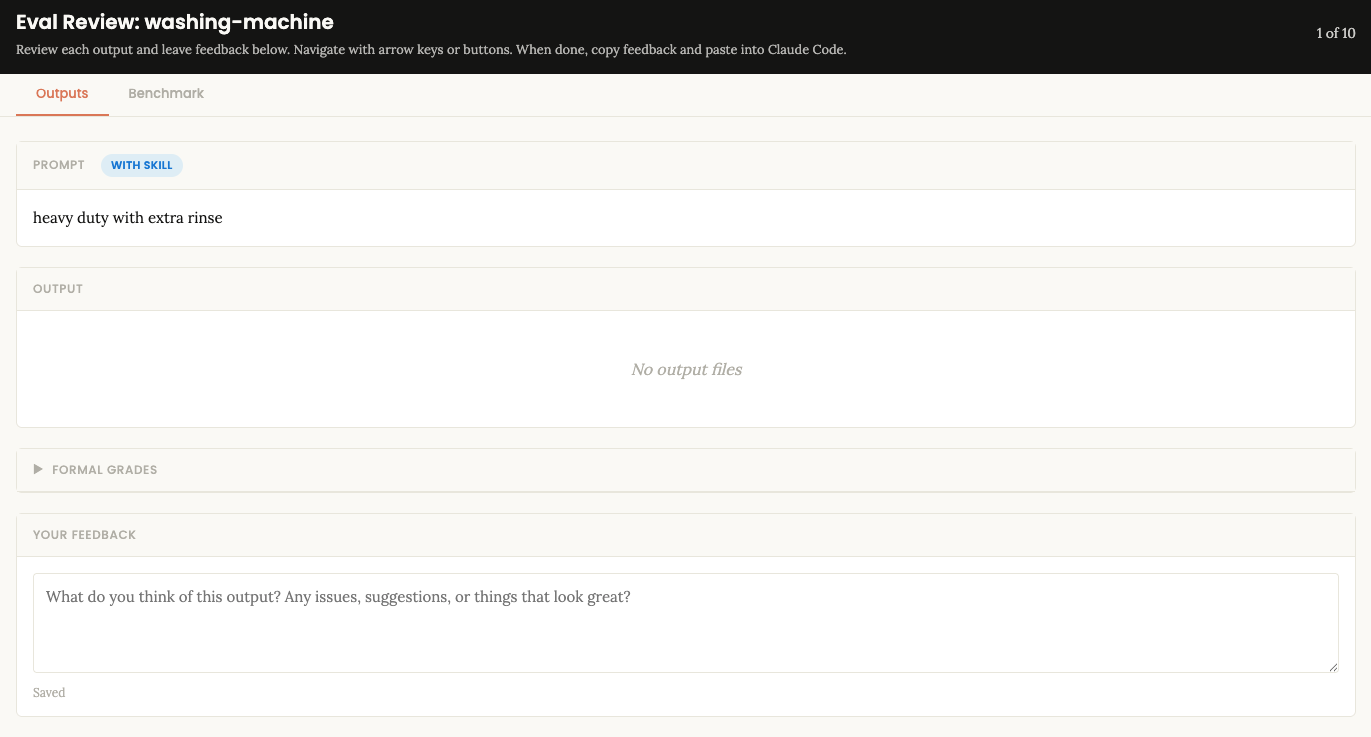
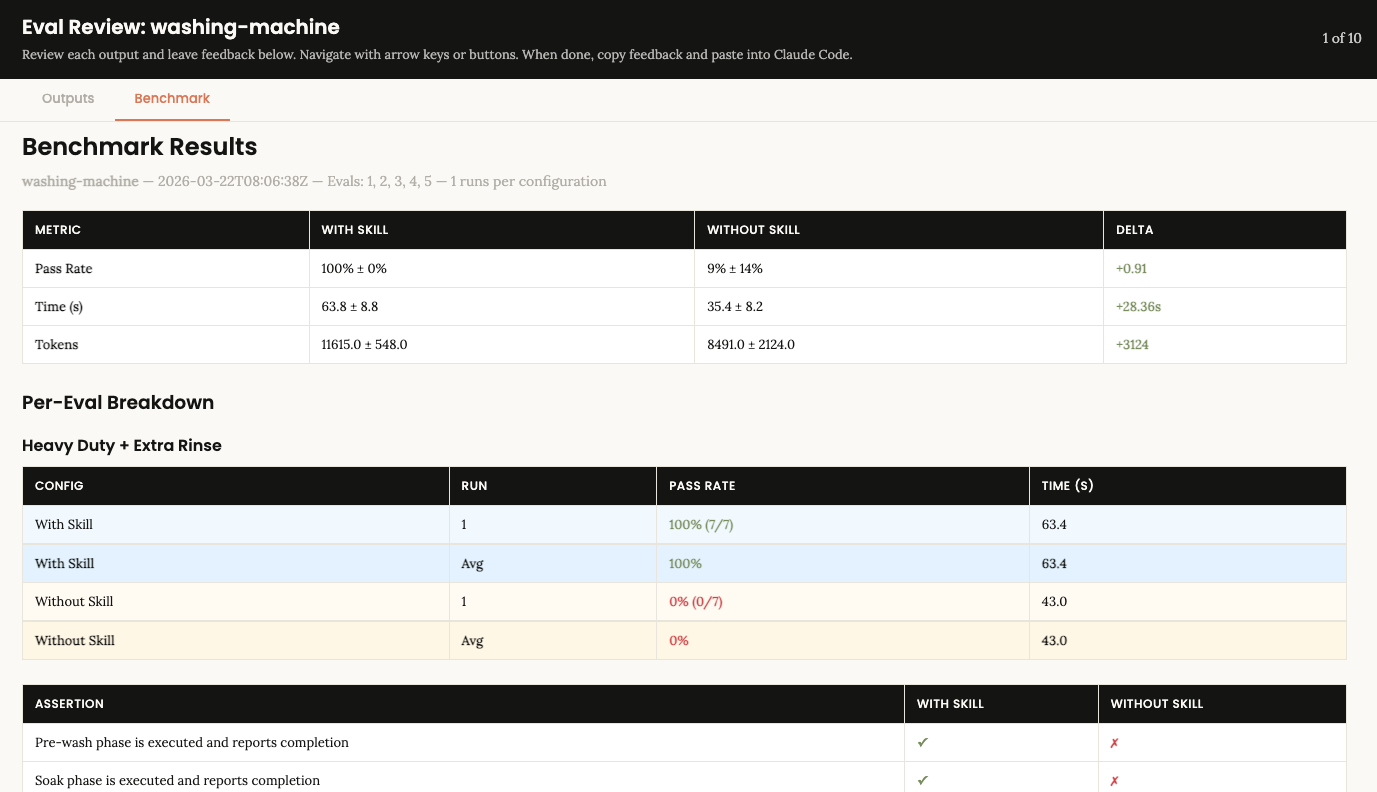
Results are collected into a benchmark.json and displayed in a browser-based eval viewer, where the author can:
- Review the output of each test case
- See pass/fail results per expectation with evidence
- Compare with-skill vs without-skill performance
- Leave feedback on individual results
The feedback loop is iterative. After reviewing, the author can ask the skill-creator to improve the skill based on their feedback, then re-run the evals, and compare across iterations.
After the first run, the skill-creator creates a washing-machine-workspace/ directory as a sibling to the skill folder. This is where all eval artefacts live, organised by iteration to track changes over time:
 washing-machine-workspace/
└── iteration-1/
    ├── benchmark.json
    ├── heavy-duty-extra-rinse/
    │   ├── eval_metadata.json
    │   ├── with_skill/
    │   │   ├── outputs/transcript.md
    │   │   ├── grading.json
    │   │   └── timing.json
    │   └── without_skill/
    │       ├── outputs/transcript.md
    │       ├── grading.json
    │       └── timing.json
    ├── quick-wash-auto/
    │   └── ...
    ├── delicates-dry-run/
    │   └── ...
    ├── auto-cycle/
    │   └── ...
    └── ambiguous-input/
        └── ...
Each eval gets a named directory containing the with-skill run, the without-skill baseline, grading results, and timing data. The benchmark.json at the iteration root, aggregates everything into a single comparison. If the skill is iterated on and evals re-run, the results go into iteration-2/, iteration-3/, and so on, so the previous results are never lost.
If you look at the aggregated result summary Claude wrote out for this skill, you'll see that without the skill, Claude doesn't make a great agentic washing machine. But with the skill, Claude can handle the task 100% of the time.
| Metric     | With Skill   | Without Skill | Delta  |
| ---------- | ------------ | ------------- | ------ |
| Pass rate  | 100% (28/28) | 10.7% (3/28)  | +91%   |
| Avg time   | 63.8s        | 35.4s         | +28.4s |
| Avg tokens | 11,615       | 8,491         | +3,124 |
Try it out yourself!
Clone the example repo, and open Claude Code at the root. Or install it via a plugin:
/plugin marketplace add https://github.com/MakerXStudio/blog-skill-examples
/plugin install washing-machine@blog-skill-examples
Then restart Claude Code. And when you're done, remove it with:
/plugin marketplace remove blog-skill-examplesOnce installed by either method, run the slash commands or context activations described below or use your own.
Slash activations (Samples)
/washing-machine heavy duty
/washing-machine quick with extra rinse
/washing-machine auto
/washing-machine delicates with double wash and super spin dry run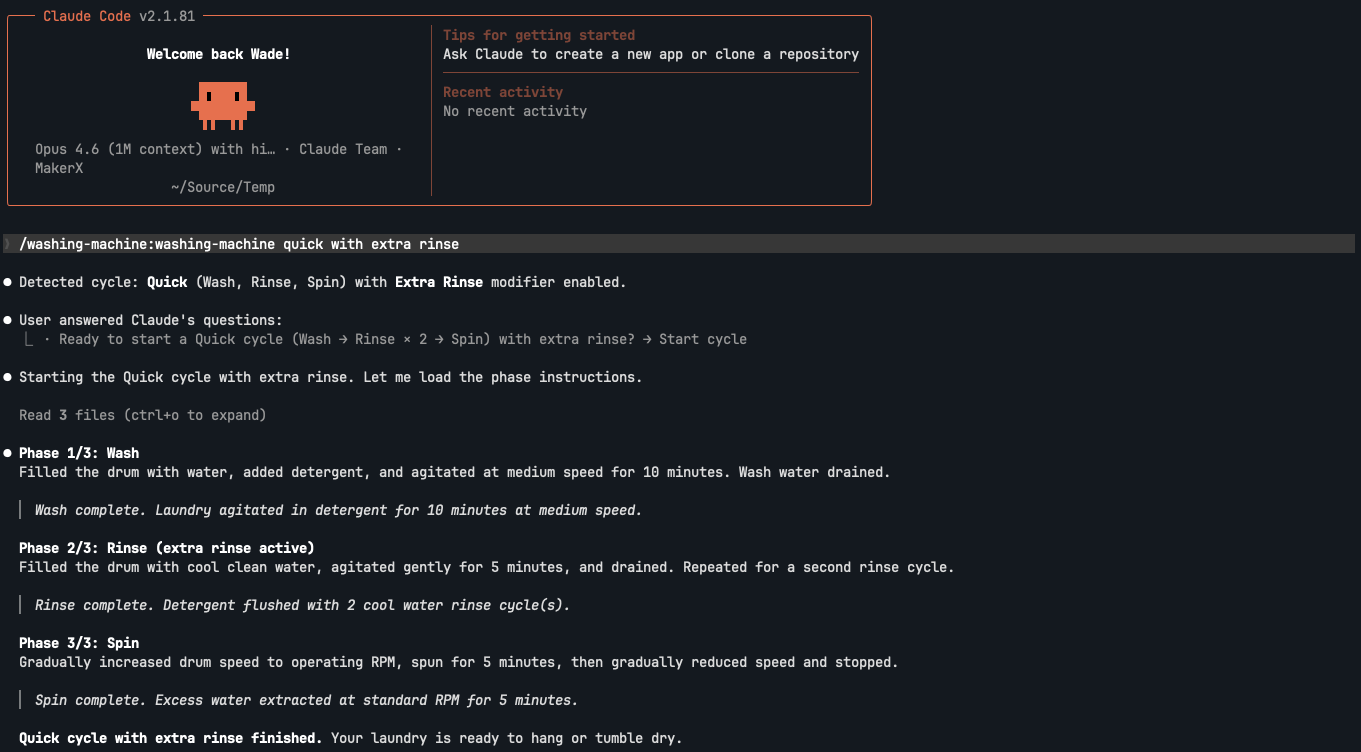
Context activations (Samples)
The laundry is really dirty, can you give it a heavy duty wash with an extra rinse?
The laundry is lightly soiled, can you do a quick wash?
The laundry is a mix of heavily soiled and lightly soiled, can you auto select the best wash cycle?
The laundry is delicate, can you do a delicate wash with a double wash and super spin, but just show me what you would do without actually doing it?